

og:title Guide: Length, Examples, vs HTML Title
og:title sets the headline on a shared link card. See how long to make it, how it differs from the HTML title, and copy-paste examples by page type.
By Abid Ali, maintainer of OG Scope
Updated · First published
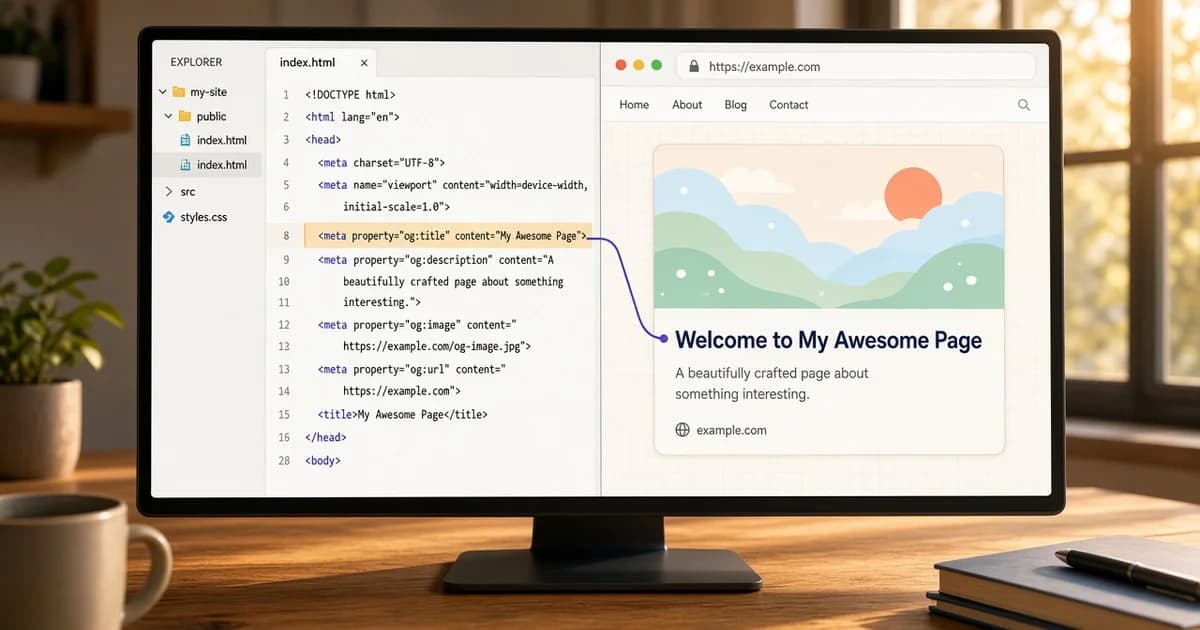
The og:title tag sets the headline on a link preview card. When a URL is shared on Facebook, LinkedIn, X, WhatsApp, Slack, or Discord, the bold line above the description usually comes from this tag:
<meta property="og:title" content="Field notes from a wet week" />An og title should name the page in a way that makes sense inside a feed or a chat, where the reader has no other context. It does not need the site name, and it does not need to match the HTML title word for word.
This guide covers how the tag works, how long it should be, how it differs from the title element, and the mistakes that put the wrong headline on a card.
How og:title works
The tag is a <meta property="og:title"> line in the head of the page. It uses the property attribute, not name, and its content is plain text. Entities such as & are decoded, but markup inside the value is not rendered as HTML.
<title>Field notes from a wet week | Field Notes</title>
<meta property="og:title" content="Field notes from a wet week" />
<meta property="og:description" content="What the rain did to the beds, and what was replanted." />
<meta property="og:image" content="https://example.com/covers/wet-week.webp" />
<meta property="og:url" content="https://example.com/blog/wet-week" />
<meta property="og:site_name" content="Field Notes" />
The Open Graph protocol lists og:title as one of its four basic properties. When the tag is missing, many platforms fall back to the HTML title element. That fallback is convenient, but it hands the card a title written for a browser tab and a search result.
Paste the page URL into the Open Graph checker to see the og:title it reads and how that headline sits on the estimated card for each platform.
Missing og:title? How to fix it
The checker reports this as "Open Graph title is missing." The card can still show a headline, because many platforms take the HTML title instead. That title usually carries the brand suffix and wording meant for a search result.
The fix is one og:title line, like the one above, in the HTML the server returns. A tag added later by a script can be missed, because many crawlers do not run JavaScript. A framework's metadata settings or a CMS SEO plugin can write the line for every page. Run the page through the checker again to confirm the tag is read.
og:title vs HTML title
The title element and the open graph title serve different readers. The HTML title shows in the browser tab, in bookmarks, and often as the headline of a search result. og:title shows on a shared card, next to an image and a description.
| HTML title | og:title | |
|---|---|---|
| Where it shows | Browser tab, bookmarks, search results | Link preview cards in social and chat apps |
| Typical pattern | Page name plus site name | Page name only |
| Example | Field notes from a wet week | Field Notes | Field notes from a wet week |
| Site name | Often included | Usually left to og:site_name |
| When missing | The browser shows the URL | Many platforms use the HTML title |
Use the same text in both when the HTML title already reads well on its own and has no brand suffix. Write a separate og:title when the HTML title carries a site name, a separator, or wording aimed at a search result. The site name has its own tag, and the og:site_name guide covers when to set it.
How long should og:title be?
The Open Graph protocol does not set a character limit. Each platform decides how much of the title to show, and the cut depends on the card layout, the screen width, and the font. A long title is not rejected. It is trimmed, often with an ellipsis, and some layouts wrap it to a second line first.
Many teams keep og:title around 60 characters or fewer as a working target. The more reliable rule is order: put the words that identify the page first, so a trimmed title still makes sense.
- Lead with the subject, not with the brand or a category label.
- Avoid stacking separators such as pipes, dashes, and colons.
- Write for a person reading a feed, not for a list of search terms.
- Keep the title specific enough to tell two similar pages apart.
The line under the title follows the same rules of order and clarity. The guide to writing og:description covers that second line.
og:title and SEO: what it does and does not do
Open Graph tags are not a documented Google ranking factor. The og:title SEO effect is indirect: a clear headline on a shared card can earn more visits from social and chat apps, and those visits are separate from how the page ranks. Search results draw on the HTML title and other signals. The SERP preview shows how an HTML title fits the pixel width of a result.
Writing the HTML title for search and the og:title for sharing lets each one do its job. A meta og title tuned for a feed does not change what appears in a search result.
Examples by page type
- Blog post. HTML title: "How to repot a fig tree | Field Notes". og:title: "How to repot a fig tree without losing leaves".
- Product page. HTML title: "Oak desk 140 cm | Studio Shop". og:title: "Oak desk, 140 cm, solid wood with a cable tray".
- Homepage. HTML title: "Field Notes | Garden journal". og:title: "Field Notes: a weekly garden journal".
- Tool page. HTML title: "Loan calculator | Example Bank". og:title: "Loan calculator: monthly payment and total interest".
In each case the og:title drops the brand suffix and adds the detail a reader needs to decide whether to open the link.
Common og:title mistakes
- Brand only. Every page uses the site name as its og:title, so every shared link looks like an ad for the homepage.
- Two tags. A theme and a plugin both print og:title. A platform may pick either one. Keep a single source.
- Template placeholders. Values such as "Untitled", "Home", or an unfilled variable reach production when a field is left empty.
- JavaScript-only tags. Many crawlers read the first HTML response without running scripts, so a title set in the browser can be missed.
- Keyword lists. A title packed with search terms reads poorly on a card and is trimmed before the useful part.
Check the title before sharing
- Open the page source and search for og:title.
- Confirm there is exactly one tag with a real page name.
- Read the value on its own. It should make sense without the page.
- Run the live URL through a checker and compare the estimated cards.
Platforms cache cards. After og:title changes, a platform can keep showing the old headline until it fetches the page again. The Facebook link preview guide and the LinkedIn preview guide explain how each network refreshes its copy.
Write the og:title for the card, keep the brand in og:site_name, then check the published URL in the Open Graph checker before the link goes out.