

og:image:alt: What It Is and How to Write It
og:image:alt is the text description of a share image. See when to set it, how it differs from the page alt, and a one-sentence pattern that stays useful.
By Abid Ali, maintainer of OG Scope
Published
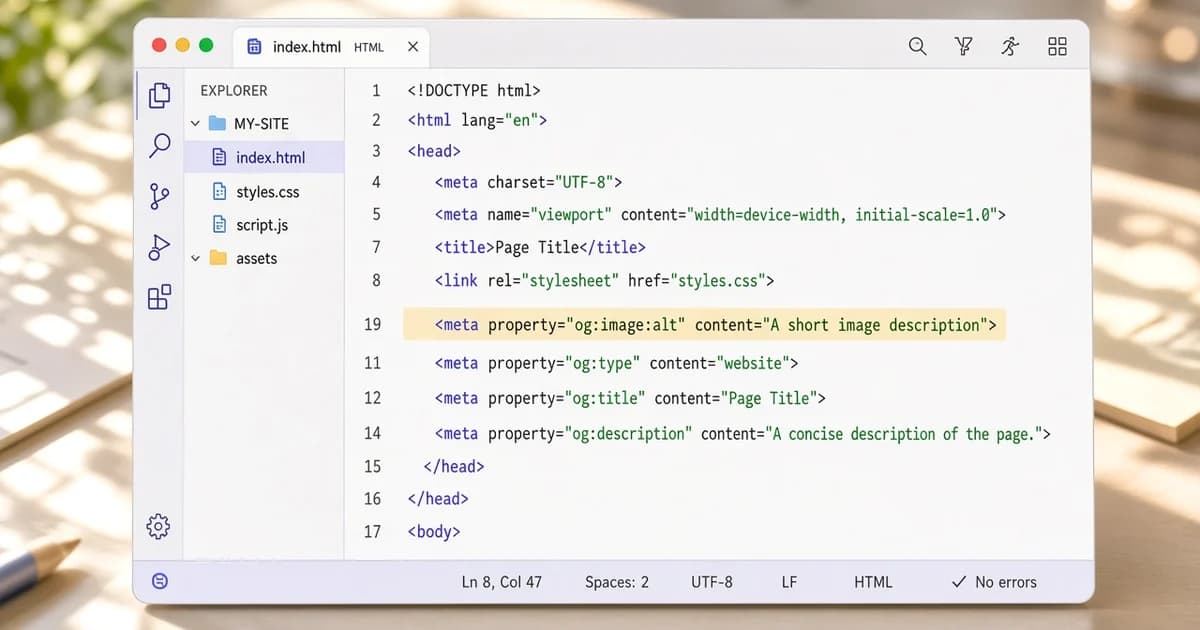
og:image:alt is a text description of the picture in og:image. It does not choose the image, change the crop, or replace og:title. Platforms that support it can read the text to people who cannot see the picture. The Open Graph protocol lists it as a structured property of the image.
The tag is optional. A card can look complete without it. Set it when the share image carries information that the title does not, such as a product photo, a chart, or a scene the reader would otherwise miss. Skip it when the image is purely decorative and the title already says the only fact.
A useful open graph image alt
Write one plain sentence about what the image shows. The open graph image alt stands alone: the reader may hear it without the title beside it. That sentence is the og image alt text. Keep it under about 120 characters so it stays a description and not a second article.
<meta property="og:image" content="https://example.com/covers/field-notes.jpg" />
<meta property="og:image:alt" content="Rain-soaked raised beds with new seedlings." />
<meta name="twitter:image" content="https://example.com/covers/field-notes.jpg" />
<meta name="twitter:image:alt" content="Rain-soaked raised beds with new seedlings." />- Name the subject. "Rain-soaked raised beds with new seedlings."
- Skip "image of" and "picture of". The tag is already an image description.
- Do not paste the headline, a keyword list, or a file name.
- Match the file. If the crop shows only the product, do not describe the whole scene that was cropped away.
A product page can say what is in the frame: color, object, and setting, in that order, only when those details are visible. "Green watering can on a wooden bench." is enough. A chart should name the comparison the picture makes, not the article title that sits above the card. A portrait or a team photo should name who is shown only when the page is allowed to identify them.
Paste the page into the Open Graph checker after the tag is deployed. An empty row for og:image:alt means the server did not send it. The picture can still be fine.
How it differs from other alt text
The alt on an img in the page body describes that placement. The share image is often a different file, framed for 1200 x 630, with text burned into the design or with the edges cropped. Write og:image:alt for that file. Copying the body alt is right only when both images show the same thing and the body alt already stands alone.
The OG image guide covers the image URL, size, and format. The Open Graph tags cheat sheet lists where this tag sits among the others. Alt text does not fix a missing file, a relative URL, or a picture under about 200 pixels.
twitter:image:alt is the same idea for the X image. Set it when twitter:image points at a different file than og:image. When both tags use the same file, one description can be repeated, or og:image:alt can be the only one you write. An empty twitter:image:alt does not remove the X picture.
Several images, and text inside the picture
Each og:image can have its own og:image:alt. Keep the same order. The first alt belongs to the first image, the second alt to the second image. A single alt after three image tags does not clearly describe all three. If the page only needs one card, publish one image and one alt.
Text baked into the 1200 x 630 file is not a substitute. Some people will not see that text, and some clients will not expose it. If the picture says "March 14" in a corner, the alt should still say the date when the date is the point of the image. Do not repeat a paragraph of body copy. One sentence is the og image alt text, not a transcript of the article.
Decorative marks, a gradient, or a logo tile can take a short alt that names the brand mark, or be left without an alt when the title already names the site. An alt that says "banner", "hero", "og-image-final-v3", or a list of keywords describes the file in the CMS, not the picture.
What to leave out
Do not use the alt as a second title, a call to action, or a list of search phrases. "Best running shoes 2026, buy now, free shipping" describes a campaign, not the picture. A screen reader user hears it as the image. If the sentence would be odd read aloud with no card beside it, rewrite it.
Do not invent details that are not in the frame. A crop that shows only a cup should not mention the cafe, the city, or a person who was cut out. Do not claim a number the chart does not show. The alt is a description of this file, at this crop, and nothing else.
File names, camera settings, and CMS field labels stay out of the tag. So do empty phrases such as "image", "photo", and "thumbnail". If you cannot say what the picture shows in one sentence, the share image may be the wrong file for the page.
Check that the tag is in the HTML
The Open Graph checker and the meta tag checker list og:image:alt when they read the page. Confirm the tag in the page source, not only in a component that runs in the browser. Crawlers do not run that JavaScript, so a client-rendered alt is the same as no alt.
Escape quotes inside the content attribute, or use a sentence that does not need them. A broken attribute can swallow the rest of the head, which drops og:image as well as the alt. After the HTML is valid, the description can sit there without changing how the card is cropped.