
Guide
Webflow Open Graph Tags: How to Set and Check Them
Where Webflow Open Graph title, description, and image are set on a page or a Collection, and how to check those tags on the published page URL.
By Abid Ali, maintainer of OG Scope
Published
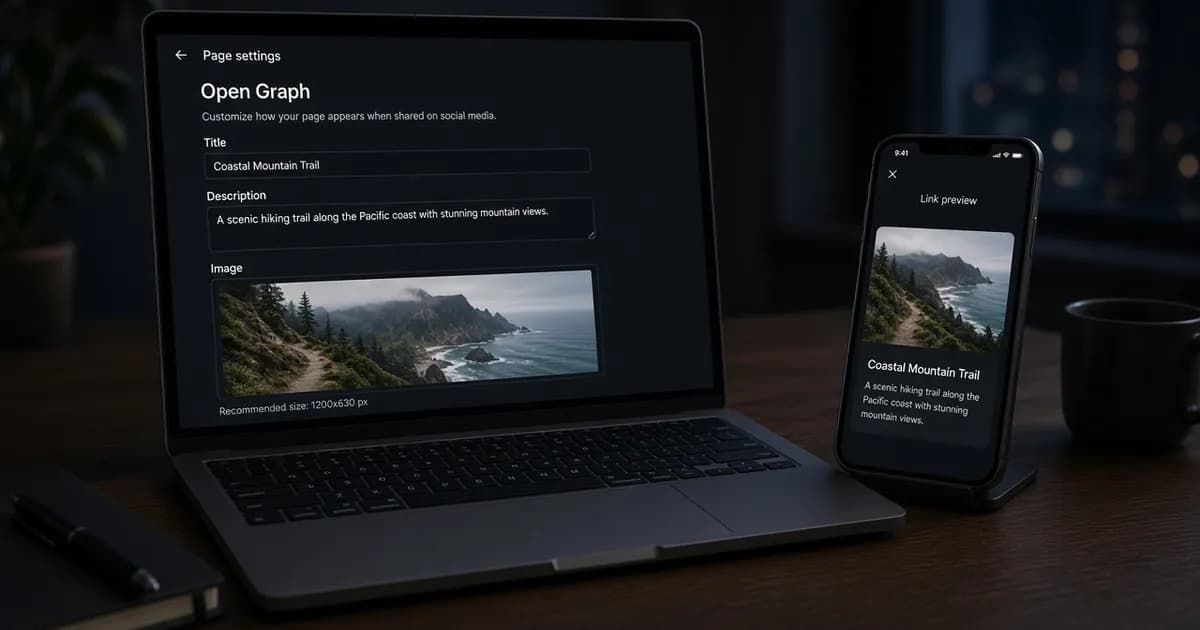
Webflow Open Graph settings are three fields on a page: a title, a description, and an image. Social sites read those values from the published HTML. The Designer can show a preview of the fields, and the card still depends on what the public URL returns after you publish.
Webflow's Open Graph help, updated 7 September 2026, says that if those settings are not set up, a share can show random content or no content. The fields are per page. There is no global Open Graph setup that fills every page at once. On a site with Webflow Localize, page-level Open Graph settings can be localized.
Where Webflow writes the tags
Open the page in the Pages panel, then Page settings, then Open Graph settings. The title is the line that shows as the shared title. The description is the text under that line. The image is the picture above both. Those are the three tags the help article says you can set. Other Open Graph tags, if the published page contains them, are outside those three fields.
The title and description can be typed, or they can be copied from the SEO title and the meta description. The help article says to use the checkboxes under each Open Graph field for that copy. A page about pricing should not reuse the homepage sentence. The help article's example is a homepage and a pricing page, which should not share the same Open Graph content.
Save the settings and publish the site before you treat the tags as live. A check of the Designer, or of an unpublished staging view that is not the public URL, does not tell you what a crawler fetched.
The image on a static page
The Webflow Open Graph image can come from the site assets or from a public URL. A Webflow social share uses that published file, not the thumbnail inside the Designer. Select image, choose the file, Add image, Save, then publish. The picker shows JPG and PNG files from the assets. WebP is not in that picker. Webflow's help says many social platforms support WebP and that support varies, and it says to add a WebP file with Add URL instead.
Add URL takes a publicly accessible link that ends in an image file extension. Paste the link, Save, and publish. To copy a link from an asset, open the Assets panel, use the image's more options, and choose Copy link. If a URL is already stored, Select image and Add URL stay hidden until that URL is deleted.
Webflow's help says to use a width of at least 1080 pixels, and it points readers to Facebook's sharing guidance for the rest. Facebook's own published figures, including 1200 by 630 for the best large display, are in the Open Graph image size section. A file made for that 1200 by 630 frame can come from the Open Graph image generator. Download JPG or PNG when the page will use the asset picker.
Collection pages
A Collection page holds one pattern for every item. Open that template through the same path, Pages panel, Page settings, Open Graph settings. For the title and description, Add field inserts a Collection field, such as the post name, instead of a sentence you would have to edit on every item. The checkboxes that copy the SEO title and meta description are available on the template as well.
The image is a dropdown. Pick an Image field, such as a main image or a thumbnail. If the Collection has no Image field, the template cannot set an Open Graph image. Webflow's help says every Open Graph image in a Collection must share the same dimensions. A mix of portrait and landscape files in that one field does not meet that rule. Size the field's images to one frame before you rely on the pattern.
What usually breaks
The published page is missing the image, and the card shows a title and a description only. Webflow's help describes that on Facebook, often the first time the link is shared, and says removing the link and adding it again can rebuild the preview. The same article lists habits that avoid the empty image: JPG or PNG, the same dimensions across the site's Open Graph images, a pass through Facebook's debugger before the first share and again after the image changes, and width and height tags so the crawler can draw the image without waiting on the download.
Those width and height tags are not fields in Open Graph settings. Webflow's help gives this snippet for Site settings, Custom code, Head code, when every image uses the same pixels. Replace the numbers with the pixels you actually use:
<meta property="og:image:width" content="1200" />
<meta property="og:image:height" content="630" />
When images differ by page, the help article says to put that snippet in the page's custom code in Page settings instead of in the site head. A Collection still has to keep one size for every item, so the site-level snippet fits a Collection that already follows that rule. The image not showing guide covers a file that fails for other reasons, such as a URL that does not return the image.
A second break is an old card. The HTML can be right while Facebook still shows the previous scrape. Webflow's help says to paste the link in the Sharing Debugger and choose Debug, then Scrape Again when the data is stale. That tool requires a Facebook login. LinkedIn's Post Inspector is the equivalent Webflow names for a re-scrape and for seeing when LinkedIn last updated the preview. It requires a LinkedIn login. For X, Webflow's help says the Card Validator no longer shows a preview of the link, and that a composed post is where the card can be seen. The validator still requires an X login.
A third break is checking the wrong URL. Page settings can look finished while the last publish is older. Use the public https address, including the path of the Collection item you mean to test, not only the homepage.
Check a published URL
Publish, copy the public URL, and open the page source. Search for og:title, og:description, and og:image. The image value should be an absolute URL that returns the file, not a Designer asset that only you can see. Then paste that same URL into the Open Graph checker. It reads the HTML from the public response and shows an estimated card. The estimate is not a screenshot of Facebook, LinkedIn, or X, and it does not replace the debugger those sites provide.
Repeat the check after you change the image or the checkbox that copies the SEO title. A title that is right in SEO settings and wrong in the Open Graph field usually means the checkbox is off and the Open Graph title was typed separately. Turn the checkbox on when the two lines should stay the same, or type the share line on purpose when the card should say something the search title does not.
Check the live URL
Paste the page into the Open Graph checker to see the tags the server sends.
Open the Open Graph checker